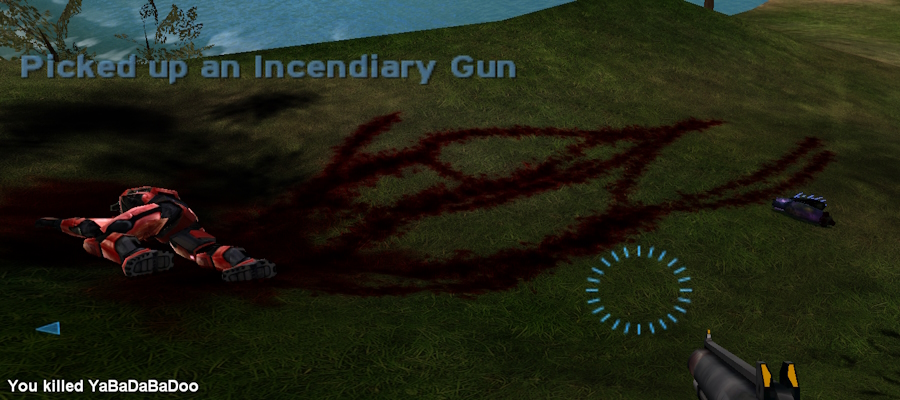
Concept
For small flows in dynamic environments, I've found that two-dimensional simulation is far more convincing than three, due to the latter's high resource demands limiting fidelity ...even on modern engines. My approach is to use a heavy and fully-transparent particle, which generates decals on collision, and spawns children upon death to create forking paths.
Halo Tutorial
An implementation on the PC version of Halo 1.
Goal
A dynamically flowing blood visual, triggered by either an explosion that gets past shields, or being run over by a vehicle. All showcased maps feature this effect.
Tool Needed
Ideally, perform this tutorial on the map that you would like the effect in, because Eschaton's rebuild process scrambles complex tag references. This can be corrected afterward, however, it can be difficult.
Instructions off as you go!
Tag Duplications
- Non-recursively duplicate the "effects\blood aoe human" effect.
- Recursively duplicate the "effects\particles\solid\blood h decal causing" particle.
Modifications
- Navigate to your original effect tag of "effects\blood aoe human".
- Under Particles 2 ColorARGBs, set the alpha levels to 0.
- Under Particles 2 Floats, set the distribution radius bounds to 0.4, and the velocity bounds to 0.
- Under Particles 2 Int16s, change the count bounds to 2–3.
- Find your original "effects\particles\solid\blood h decal causing" particle.
- Under Bitmask32s, uncheck dies at rest in the first flag group.
- Under Floats, change the lifespan bounds to 2–3.
- In the Reference Swapper, swap the one point physics reference to your duplicated "effects\point physics\stones" tag, and then swap the second effect reference (which should be initially nulled out) to your duplicated effect "effects\blood aoe human".
- Visit your duplicated effect called "effects\blood aoe human".
- Under Particles 2 ColorARGBs, set the alpha levels to 0.
- Under Particles 2 Floats, change the distribution radius bounds to 0, velocity to 1, velocity – to to 0.5, and the velocity cone angle to 3.14.
- Under Particles 2 Int16s, change the count bounds to 2.
- In the Reference Swapper, null all references except the second of the three particle references, and swap that remaining reference to your duplicated "effects\particles\solid\blood h decal causing" particle.
- Go to your duplicated "effects\particles\solid\blood h decal causing" particle.
- Under Bitmask32s, uncheck dies at rest in the first flag group.
- Under Floats, change the lifespan bounds to 2–3.5.
- Locate your duplicated point physics tag "effects\point physics\stones".
- Under Floats, change air friction to 10, surface friction to 0.1, and elasticity to 0.
- Navigate to your original small blood splat decal "effects\decals\blood splats\blood splat small".
- While using the HMT plugins, go to Floats to set the lifetime bounds to 23–25.
- Find your duplicated small blood splat decal "effects\decals\blood splats\blood splat small", which you have as a result of your recursive tag duplication.
- While using the HMT plugins, go to Floats to change the radius bounds to 0.03, and the lifetime bounds to 23–25.